Learn how to monitor your child’s iPhone 18 activity safely using Apple’s Screen Time, Family Sharing, and the most powerful third-party monitoring solution, FlexiSPY. Step-by-step guide to set app limits, block adult content, enable Ask to Browse, and track screen time—all while protecting your child’s privacy. Perfect for parents of kids aged 6–17.

“I bought my child an iPhone 18. It brings him convenience, sure—but it also brings me a fair share of headaches, and honestly, a lot of anxiety. Because he doesn’t have great self-control. Lately, I keep seeing news stories about teenagers getting involved in crimes—and in most cases, they were first groomed or incited online, and then carried out the acts in real life. I want my kid to stay as far away as possible from those criminals that make every parent’s blood boil. I want to know what he’s doing online, in real time. How can I make that happen? – From A DAD”
If you feel the same way, you’re not alone. Here’s what I’ve learned after trying every tool out there. Giving your child an iPhone 18 feels like handing them the keys to a city. It’s exciting—they can learn, connect with friends, and explore the world from their pocket. But let’s be honest: it also opens doors you didn’t know existed. Excessive screen time, accidental exposure to adult content, online predators, and cyberbullying are real threats. That’s not fear-mongering. That’s just parenting in 2026.
So what can you do? You could bury your head in the sand. Or you could equip yourself with the right tools. In this guide, I’ll walk you through three options—Screen Time, Family Sharing, and FlexiSPY—and explain why, after trying all of them, I believe the smartest move is to layer them together.
1. Screen Time (Apple Built-in)
Screen Time is Apple’s free, built-in dashboard for understanding and limiting how your child uses their iPhone 17 and other iOS phones. It’s the first thing most parents discover—and for good reason.

What It Does
- Tracks usage – Shows you exactly which apps your child opens most often, how many times they pick up the phone each day, and which apps are buzzing with notifications.
- Manages contacts – Limits who your child can call, message, or FaceTime.
- Schedules Downtime – Locks everything except approved apps during homework or bedtime hours.
- Filters content – Blocks adult websites, restricts explicit music/podcasts, and controls App Store purchases.
- Sets App Limits – Lets you cap daily time on entire categories like social media or games.
Step-by-Step Setup
If your child is in your Family Sharing group (using your iPhone):
- Open Settings → tap Screen Time.
- Under “Family,” tap your child’s name.
- Follow the prompts to set age-appropriate restrictions, then lock everything with a Screen Time passcode that only you know.
Setting it up directly on your child’s iPhone 18 (no Family Sharing yet):
- Open Settings → tap Screen Time.
- Tap App & Website Activity → tap Turn On App & Website Activity.
- Scroll down, tap Lock Screen Time Settings, and create a 4-digit passcode.
Pro tip: For children under 13, you’ll need to create a child account through Family Sharing. Apple automatically applies recommended safeguards based on their age, which saves you a ton of guesswork.
What I Like 👍
- Privacy-conscious – All data stays within Apple’s ecosystem.
- Completely free – No subscription, no hidden costs.
- Zero installation – It’s baked right into iOS.
- Works across devices – The same rules apply to their iPad and Mac too.
What Frustrates Me 👎
- No social media visibility – You’ll have no idea what’s happening inside Instagram DMs or WhatsApp chats.
- You can’t see actual messages – Usage reports tell you how long they spent on Messages, but not who they talked to or what they said.
- Weekly summaries only – You get a recap on Monday morning. By then, the damage may already be done.
- Kids find workarounds – I learned this the hard way. My son discovered he could bypass App Limits by going into Settings → General → Date & Time and manually rolling the clock back. I eventually locked that down by turning off “Set Automatically” and setting a Screen Time passcode—but it took me a week to figure out what he was doing.
2. Family Sharing (Apple Built-in)
Think of Family Sharing as the foundation. Without it, advanced Screen Time controls simply don’t work. It’s the glue that ties your Apple devices together as a family.
What It Does
- Creates a child account – Sets up an Apple Account with age-appropriate restrictions from day one.
- Ask to Buy – Requires your approval for every app download or in-app purchase. Yes, even the free ones.
- Ask to Browse – New in iOS 27: your child must ask permission before visiting any new website in Safari.
- Location sharing – See where your child is, and help them find a lost device.
- Enables Screen Time management – Lets you control Screen Time remotely from your own iPhone, rather than fiddling with your child’s device.
How to Set It Up
On your iPhone:
- Open Settings → tap your name at the top → tap Family Sharing.
- Tap Add Member.
- If your child doesn’t have an Apple Account, tap Create an Account for a Child. If they already have one, tap Invite People.
- Follow the rest of the prompts. Once they’re added, you can return to Screen Time and start configuring content restrictions.
Heads-up: Family Sharing isn’t optional—it’s a prerequisite. You can’t access Screen Time parental controls without it. So get this done first, before you try anything else.
What I Like 👍
- Free and essential – No cost, and absolutely necessary for monitoring.
- Centralized management – Purchases, communications, and screen time all live in one place.
- Smart defaults – Apple adjusts safeguards based on your child’s age, so you don’t have to be a tech expert.
What Frustrates Me 👎
- Still no message content – Like Screen Time, it can’t reveal what’s actually being said in conversations.
- Setup takes time – It’s not complicated, but you do need to sit down and go through each menu carefully.
- Apple-only – It only works with Apple devices. If your child also uses an Android tablet or a Windows PC, you’re on your own.
- It’s an enabler, not a monitor – Family Sharing gives you the ability to monitor, but it doesn’t actually show you any activity itself.
3. FlexiSPY (Third-Party)
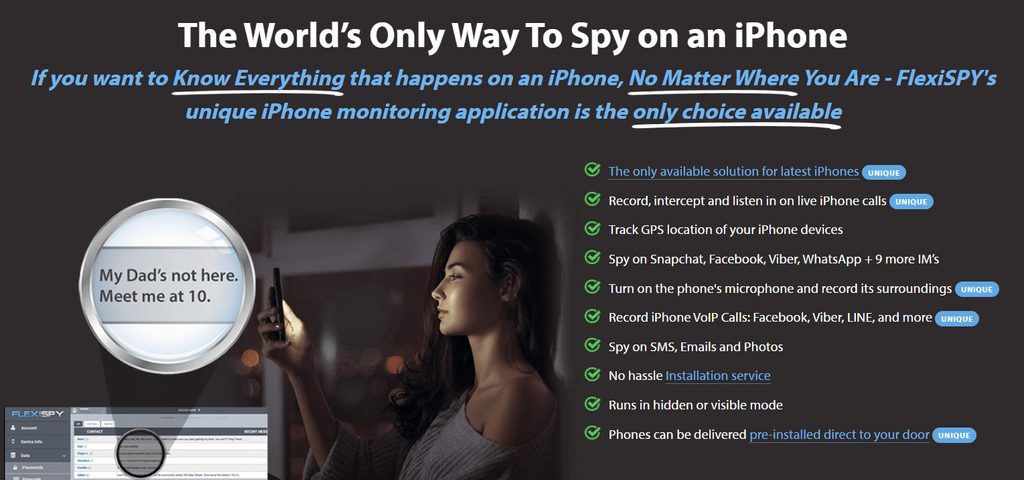
Now we’re getting into the heavy artillery. FlexiSPY is the most powerful monitoring solution available for iPhone 18, and it fills the gaps Apple left wide open. It doesn’t just tell you how long your child used an app—it shows you what they did inside it.
What It Does
- Monitors messages – Reads iMessages, SMS, call logs, contacts, and even encrypted chats from WhatsApp (provided they back up to iCloud).
- Live call interception and recording – FlexiSPY is the only consumer monitoring app that allows you to listen in on live phone calls remotely and undetected. Whenever your child’s iPhone 18 calls or receives a call from a number on your watchlist, you receive an instant alert, and you can patch yourself into the live call to listen in.
- Spycall – Remotely activate your child’s iPhone 18 microphone to listen to their surroundings in real time, secretly and without any indication on the device. Just enter your own phone number in your FlexiSPY account, then call their phone when it’s not in use to be patched in silently.
- Tracks social media – Shows conversations across platforms including WhatsApp, Facebook Messenger, Instagram, Skype, LINE, Viber, Snapchat, Telegram, Tinder, and more—flags risky keywords like “suicide,” “sex,” or “kill” in real time.
- Keylogger – Captures every keystroke made on the iPhone 18, including passwords, search phrases, and messages typed into any app.
- Filters the web – Blocks entire categories of sites (porn, gambling, violence) across all browsers—including incognito mode.
- Geofencing – Lets you create safe zones (like home or school) and sends an alert the moment your child leaves them.
- Remote camera and screen sharing – Access the iPhone 18’s camera and view the live screen remotely from your dashboard.
- Complete stealth – No app icon, no notifications, and processes disguised with innocuous names. Your child will never know it’s there.
How It Works on iPhone 18
FlexiSPY offers two installation approaches for the iPhone 18:
- Jailbreak method (recommended for full features): For complete functionality—including live call interception, Spycall, ambient listening, and the full keylogger—the iPhone 18 needs to be jailbroken. FlexiSPY provides professional remote installation service, where an experienced technician remotely connects to the device and handles the entire jailbreak and setup for you. This is a level of hands-on support that no other monitoring app provides.
- No-jailbreak method (limited): FlexiSPY also supports a no-jailbreak version for iPhone, but it is limited to WhatsApp IM chats, location tracking, call logs, contacts, calendars, SMS, and photos. For the complete feature set—especially call recording and ambient listening—a jailbroken device is required.
What I Like
- Unmatched visibility – You can finally see messages, chats, browsing history, call recordings, and even deleted content. No other app comes close.
- Real-time alerts – You don’t have to wait until Monday. You’ll know immediately if something concerning happens—whether it’s a call from an unknown number or a risky keyword entered into a search bar.
- Hard to bypass – Blocks VPNs and proxies, so determined kids can’t easily slip through the cracks.
- Cross-platform compatibility – FlexiSPY is one of the very few solutions that works seamlessly across Android, iOS, Windows, and macOS. You can monitor your child’s iPhone 18 from whatever device you already own—your Android phone, your iPhone, your Windows laptop, or your Mac.
- Professional remote installation – The remote setup service eliminates the technical barrier, making FlexiSPY accessible even for parents who aren’t tech-savvy.
What Frustrates Me
Ethical tightrope – Experts agree that monitoring works best when paired with transparency. If your child discovers you’re tracking them without their knowledge, it could backfire badly. A little honesty goes a long way: “We’re using these tools because we love you and want to keep you safe.” It’s not a perfect conversation, but it’s better than the alternative.h them how to navigate the world—and make sure they know we’re always there to catch them if they fall.
Not free – FlexiSPY is a premium subscription. Pricing starts at $49.95/month** for the Lite plan, **$79/month for Premium (which includes call interception and Spycall), and $119/month** for Extreme (which adds ambient listening and full remote control). Annual plans offer significant savings—the Premium annual plan is **$179, bringing the monthly cost down to under $15.
Requires jailbreak for full features – The most powerful capabilities—live call interception, Spycall, ambient listening—require a jailbroken iPhone 18. This is a trade-off for the depth of access FlexiSPY provides.
Steeper learning curve – The dashboard is feature-rich, which can feel overwhelming at first. But the remote installation service and 24/7 support help bridge that gap.
Why I Recommend FlexiSPY
Let’s be blunt. Screen Time and Family Sharing are great—for basic stuff. They’re the equivalent of putting a speed bump in your driveway. FlexiSPY is like installing a full security system with cameras and motion detectors.
Here’s a side-by-side comparison that tells the whole story:
| Feature | Screen Time + Family Sharing | FlexiSPY |
|---|---|---|
| See text message content | ❌ No | ✅ Yes |
| See social media chats | ❌ No | ✅ Yes |
| Recover deleted messages | ❌ No | ✅ Yes |
| Real-time risk alerts | ❌ No | ✅ Yes |
| Geofence notifications | ❌ No | ✅ Yes |
| Live call interception | ❌ No | ✅ Yes (jailbreak) |
| Spycall (ambient listening) | ❌ No | ✅ Yes (jailbreak) |
| Call recording | ❌ No | ✅ Yes (jailbreak) |
| Keylogger | ❌ No | ✅ Yes |
| Screen recording | ❌ No | ✅ Yes |
| Block VPNs/proxies | ❌ No | ✅ Yes |
| Cross-platform monitoring | ❌ No | ✅ Yes (Android, iOS, Windows, macOS) |
| Remote installation service | ❌ No | ✅ Yes |
| Cost | Free | Paid (plans from $49.95/mo) |
Here’s what sealed the deal for me. One afternoon, my son came home from school looking withdrawn. He didn’t want to talk. I checked his Screen Time report—it told me he’d spent 47 minutes on Messages that day. That was it. No context. No clue what happened. Had I been using FlexiSPY, I would have seen the exchange with a classmate that left him in tears. I would have known what was going on before he walked through the front door.
That’s the difference between reactive parenting and proactive parenting.
Here are four reasons I think FlexiSPY is worth every penny:
- It shows you what actually matters. Screen Time tells you how long your child used an app. FlexiSPY tells you what they did—who they talked to, what they said, and whether they’re being groomed or bullied. The live call interception alone is a feature no other consumer app offers.
- You get alerts in real time. You don’t have to wait for a weekly digest. If a predator messages your child, or if they enter a dangerous keyword into a search bar, your phone buzzes immediately.
- Kids are crafty. They figure out workarounds. Screen Time is, as one parent put it, “honestly just a speed bump for determined kids.” FlexiSPY blocks VPNs and proxies, and its stealth mode means there’s no icon to find—so it’s much harder to bypass.
- Peace of mind is priceless. One reviewer summed it up perfectly: “FlexiSPY is hands-down the best for responsible monitoring. It gives me significant peace of mind without breaking the bank.” I couldn’t agree more.
Final Thoughts: Why Monitoring Is Non‑Negotiable
I’ll say it plainly: monitoring your child’s iPhone 18 activity isn’t about suspicion, control, or helicopter parenting. It’s about protection in a world that wasn’t built for children.
- Cyberbullying is everywhere. One out of every five kids experiences it online. Keyword alerts can help you catch it early—before it escalates into depression or worse.
- Predators are sophisticated. They know how to gain a child’s trust. Monitoring communications gives you a vital early warning system.
- Screen time takes a toll. The American Academy of Pediatrics links excessive social media and gaming to anxiety and sleep disorders. Apple’s new Time Allowances—based on peer‑reviewed research—are a step in the right direction.
- Kids make mistakes. They stumble into inappropriate content, sometimes by accident. Content filters act as a safety net, not a punishment.
“No app creates genuine trust—only consistent, open communication without judgment does that.” That’s the real takeaway here. The tools we’ve discussed—Screen Time, Family Sharing, and FlexiSPY—are just that: tools. They support your parenting, but they don’t replace it.
My final recommendation:
- Start with Family Sharing to set up your child’s account and unlock all the necessary controls.
- Layer on Screen Time for daily usage limits, downtime schedules, and basic content filtering.
- And then, if you truly want to know what’s happening in your child’s digital world, add FlexiSPY for the deep visibility, live call interception, Spycall, and instant alerts that Apple simply doesn’t offer.
Monitor with transparency. Have honest conversations with your child about why you’re using these tools. And remember: the goal isn’t to control every minute of their day—it’s to give them the freedom to explore, learn, and grow, while keeping a caring hand on their shoulder when they need it most.
Because at the end of the day, our job isn’t to keep them in a bubble. It’s to teach them how to navigate the world—and make sure they know we’re always there to catch them if they fall.