

Let me be honest: I never paid attention to file extensions until last month, when a movie night turned into a two-hour tech support session. The culprit? A .BIN file.
I'd downloaded an old noir film—the kind with grain and great dialogue—and it came as a dreaded .BIN file. Double-clicked it in my default Windows player. Nothing. Tried VLC, which usually eats everything I throw at it. It saw the file but couldn't decode the video stream properly. Then I tried copying it onto a USB stick for my Smart TV. The TV detected the drive all right—but showed an empty folder. No files, no thumbnails, nothing. If you've ever stumbled upon a BIN file, you probably know that sinking feeling when your player just shrugs at you.
The only sensible way out: convert that BIN to MP4—because MP4 plays everywhere. On your phone, on your tablet, on that stubborn TV, even on an old Xbox.
So here are my top 5 picks for the best free BIN to MP4 online converters in 2026. I tested each one so you don't have to.
Website: https://convert.guru/
Convert.Guru is the most reliable free online BIN to MP4 converter I tested. It runs entirely in your browser, so there's no software to install and no account required. The interface is dead simple: upload your file, select MP4 as the output format, and click convert.
What I liked:
Completely free – no registration, no hidden fees
No watermark on the output file
Supports files up to 500MB – good for most movie files
Files are deleted immediately after conversion
The catch: Upload speed depends on your internet connection, and I felt a bit nervous about privacy—though they claim files are deleted right after conversion.
Best for: One-off conversions of small to medium-sized BIN files.
Website: https://anyonlinetool.com/en/tool/bin-mp4-converter
AnyOnlineTool offers a dedicated BIN to MP4 converter that extracts video data from BIN disk image files and converts it to MP4 for easy playback on any device.
What I liked:
Supports H.264 and H.265 (HEVC) codecs – gives you flexibility between file size and quality
500MB file size limit – similar to Convert.Guru
Secure processing – files are deleted from servers after conversion
Multiple quality presets – choose your preferred MP4 video quality and codec options
The catch: The interface is functional but not as polished as some competitors.
Best for: Users who want control over video codec and quality settings.
Website: https://convertintomp4.com/
ConvertIntoMP4 is a rising star in the online conversion space. It supports 2,200+ conversion pairs across 270+ formats, with 60+ additional tools like subtitle generator, video trimmer, and compressor.
What I liked:
No signup required – just upload and convert
No watermark on the output
No upload-limit maze – straightforward and transparent
Files auto-delete after 2 hours – good for privacy
Free API available for developers
The catch: Still relatively new, so the user base is growing rather than established.
Best for: Users who want a modern, no-nonsense converter with extra editing tools.
Website: https://dang.ai/tool/free-online-video-converter-videosnap-cc
VideoSnap takes a completely different approach: it processes your media locally on your device without uploading files anywhere. This is a game-changer for privacy-conscious users.
What I liked:
No upload required – everything happens in your browser
No watermark
No signup needed
Fast and private – your files never leave your device
Completely free to use
The catch: Because processing happens locally, performance depends on your device's capabilities.
Best for: Privacy-focused users who don't want to upload sensitive BIN files to any server.
Okay, this one isn't strictly an online converter—but it's a powerful, all-in-one desktop application that handles BIN files with ease. I dragged my BIN file into Acrok, selected MP4 under the output format dropdown, tweaked a few settings, and hit "Convert."
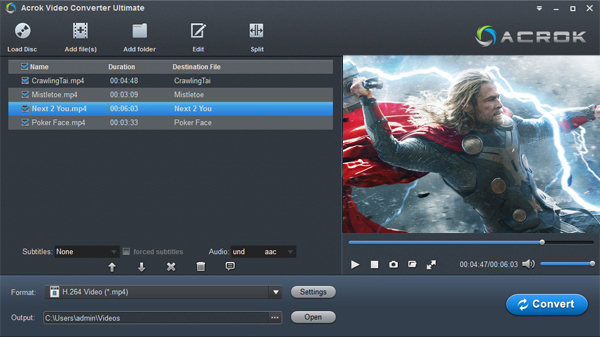


What I liked:
Supports a huge range of formats – MKV, AVI, WMV, MP4, MOV, FLV, MTS, MXF, and more
Handles DVD/Blu-ray and ISO files – including BIN disk images
Built-in video editing – trim, crop, merge, add subtitles (SRT/ASS/SSA), apply watermarks, convert 2D to 3D, and adjust effects
Batch conversion – process multiple files at once
GPU acceleration – significantly faster processing speeds
Supports modern codecs – H.265/HEVC, Apple ProRes, DNxHD, and more
Audio extraction – convert audio tracks to MP3, AAC, WAV, FLAC, and others
The catch: It's not free forever—Acrok offers a free trial with full features, but the full version is paid. Also, it requires installation on Windows or macOS, so you can't use it on the go from a browser.
Best for: Users who need a professional-grade converter with advanced editing features, batch processing, and DVD/Blu-ray support, and don't mind installing software.
Convert BIN files to H.264 or H.265 MP4 at high speed. Play your videos on phones, tablets, and Smart TVs without compatibility issues.
| Feature | Convert.Guru | AnyOnlineTool | ConvertIntoMP4 | VideoSnap | Acrok Video Converter Ultimate |
|---|---|---|---|---|---|
| Price | Free | Free | Free | Free | Free trial |
| Installation | No | No | No | No | Yes (Windows/macOS) |
| Max File Size | ~500MB | 500MB | Not specified | Depends on device | Unlimited |
| Upload Required | Yes | Yes | Yes | No | No |
| Watermark | No | No | No | No | No |
| Privacy | Files deleted after conversion | Files deleted after conversion | Auto-delete after 2h | Best – no upload | Best – local only |
| Ease of Use | Very intuitive | Simple | Simple | Simple | Easy, with advanced options |
| Extra Tools | None | Codec selection | Trimmer, compressor, subtitles | Basic conversion | Full editor – trim, crop, merge, subtitles, watermarks, 2D→3D, effects |
| Batch Conversion | No | No | No | No | Yes |
| DVD/Blu-ray Support | No | No | No | No | Yes |
If you ask me, there's no single "best" converter—it depends on what you need:
For quick, one-off conversions → Convert.Guru is your friend. It's simple, free, and gets the job done without fuss.
For privacy-first users → VideoSnap is the clear winner. No uploads, no servers, no privacy worries—everything stays on your device.
For power users who need professional features → Acrok Video Converter Ultimate is a standout choice. It's not just a converter—it's a complete media toolbox with editing, batch processing, and DVD/Blu-ray support that the online tools simply can't match.
For users who want quality options → AnyOnlineTool gives you H.264 and H.265 codec choices.
For modern, all-in-one needs → ConvertIntoMP4 offers 60+ tools beyond just conversion.
After all, I just wanted to watch that noir film—not earn a degree in video transcoding. Now I keep a few of these bookmarked, and I haven't dreaded a BIN file since.
Bottom line: You don't need to pay for expensive software to convert BIN to MP4—unless you need advanced editing and batch processing, in which case Acrok Video Converter Ultimate is worth the investment. These five tools cover every use case—from quick online conversions to professional desktop solutions. Pick the one that fits your needs and start watching your BIN videos today.
You may also need to read:
How to play MKV movies on Samsung Smart TV?
Best Parental Control Software for iPhone 17e
Can I track an iPhone 18 using its phone number?
The Best Parental Control App for Android & iPhone in 2026! Keeping Your Kids Safe Online.
This software is for legal use only. Do not install on devices you do not own; prior owner consent may be required by law. Violations can result in fines or criminal charges. Consult your legal advisor before use. You assume full liability for any installation; we disclaim all responsibility.
Copyright © 2026 parentaltool.com. All Rights Reserved.